Certified Translations and Civil Documents for US Immigration
How to translate and prepare birth, marriage and police documents for USCIS and the NVC: translator certifications, the reciprocity schedule, unavailable records and secondary evidence.
 Tradiciones del Mundo
More immigration forms can now be filed online, and they cost less that way. A USCIS online account is also the best place to follow your case and receive notices.
Key points
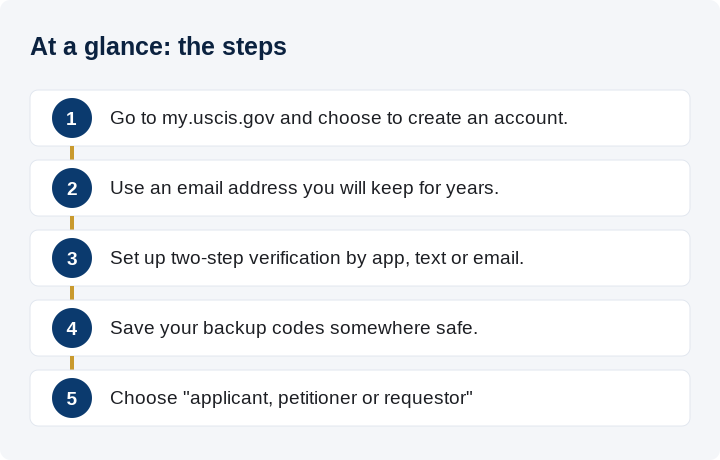
USCIS has gradually moved from paper to digital processing. Forms such as the N-400, I-90, I-130, I-765, I-131 and some I-485 cases can be filed online, and every applicant can create an account to track cases. This guide explains how to set it up, what you can do with it and how to avoid common problems.
If you file online, keep your login details safe and updated: your account becomes the main channel between you and USCIS.
If you filed on paper, your receipt notice (Form I-797C) includes an online access code. Enter it in your account to link the case and see its documents. Not all case types can be linked.
| Online | Paper | |
|---|---|---|
| Fee | Usually $50 less | Standard fee |
| Receipt | Immediate | Weeks by mail |
| Fee waiver or reduced fee | Not always available | Available |
| Attorney representation | Through the attorney's account | Form G-28 with filing |
Scammers create websites, social media profiles and messages that imitate USCIS. Real USCIS websites end in .gov. USCIS does not ask for payment by gift card, wire transfer or cryptocurrency, and does not call to threaten deportation over unpaid fees. Report scams to the FTC.
A hypothetical permanent resident files her N-400 online, paying $710 instead of $760. The receipt appears immediately; her biometrics notice appears in the account two weeks later, before the paper copy. When USCIS requests her tax transcript, she uploads it the same day.
The list grows over time, so check USCIS's "file online" page before filing. In recent years it has included, among others:
Your case appears in the account with its receipt number. Notices such as biometrics appointments, interview letters, requests for evidence and decisions appear in the "documents" section. Turn on email or text notifications so you see new documents quickly. For online cases, you can usually respond to requests for evidence by uploading files directly, which saves mailing time.
For an online N-400: the receipt appears at once, biometrics are scheduled within weeks, the interview notice arrives months later, and the oath notice follows approval. Each notice appears in the account first, so checking it regularly gives you more time to prepare and to reschedule if necessary. Online filers also avoid lockbox rejections caused by missing signatures or wrong fees, since the system checks those before submission.
Use the account recovery options with your backup codes or the email on file. If recovery fails, USCIS provides a technical help form. Do not create a new account for a case already linked to an old one, since cases cannot easily be moved between accounts.
Finally, remember that the account does not replace legal advice: it shows what USCIS has done, not what you should do next, so read each notice carefully and ask for help when it is unclear.
No, but you can link it to see its status and notices.
Lawyers have separate accounts and file on your behalf with your consent.
Accounts are protected with two-step verification; keep your own password and recovery codes secure and never share them.
Disclaimer. This article is general information, not legal advice, and it is not affiliated with any government agency. US immigration rules, fees and processing times change often, and they changed repeatedly in 2025 and 2026. Confirm current requirements on uscis.gov and travel.state.gov, or speak with a licensed immigration attorney or a DOJ-accredited representative.
How to translate and prepare birth, marriage and police documents for USCIS and the NVC: translator certifications, the reciprocity schedule, unavailable records and secondary evidence.
Who can adjust status with Form I-485, the 245(c) bars, adjustment vs consular processing, and work and travel permits while the case is pending.
How immigrant visas are processed abroad: the National Visa Center, fees, civil documents, the medical exam, the embassy interview and entering the US.